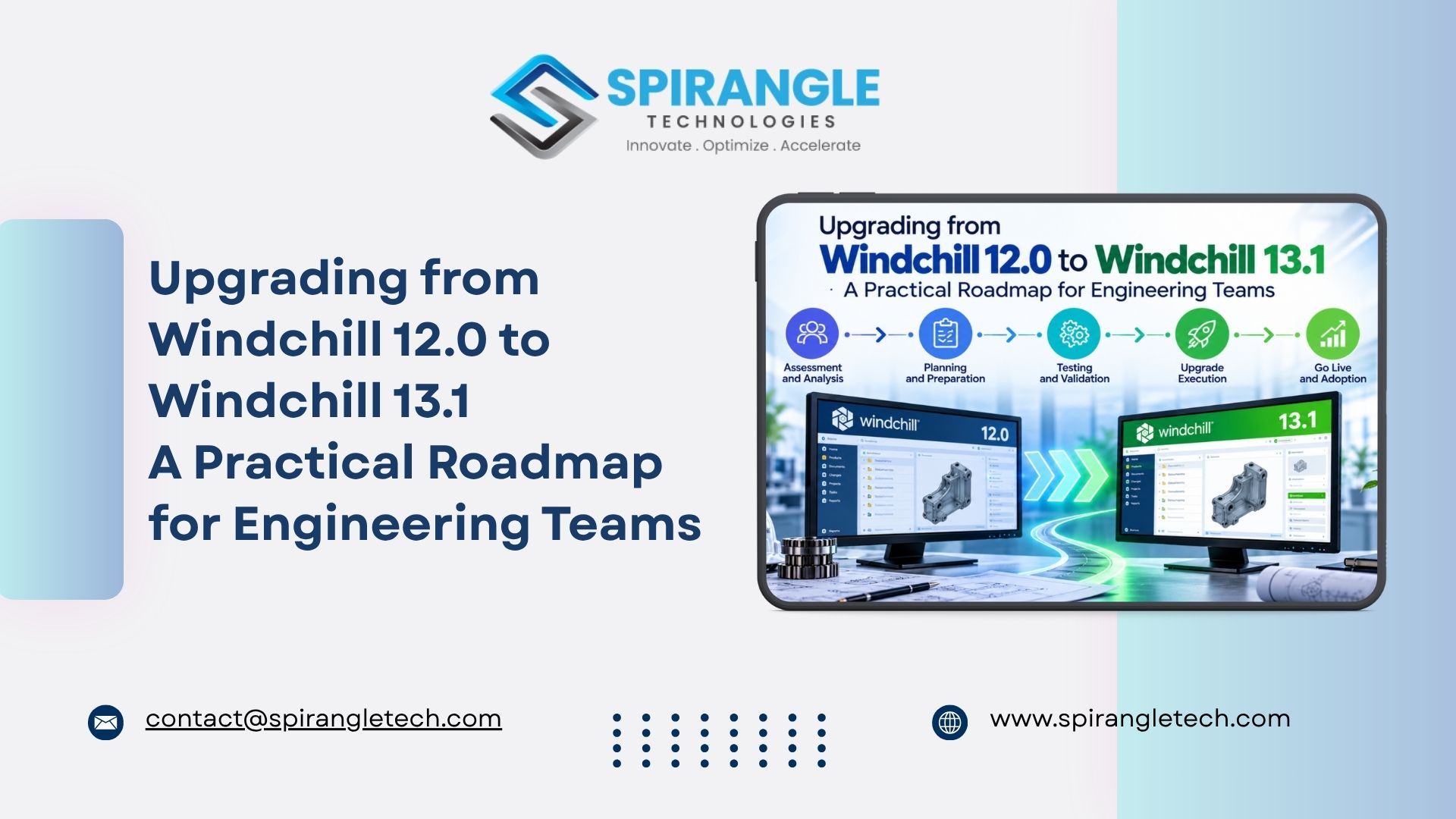
Introduction
For many manufacturers, Windchill 12.0 has been the backbone of engineering for several years: CAD data, BOMs, change processes and release workflows all run through it. But it is also showing its age. Windchill 12.0 is past PTC's standard support window, its certified platform stack is aging, and it misses everything PTC has shipped in Windchill 12.1 and the Windchill 13 line.
Windchill 13.1 is the current release stream, and it brings a redesigned Next Gen user interface, rebuilt BOM reporting, browser-based visualization and the first AI-assisted capabilities in Windchill. The question for most teams is no longer whether to upgrade, but how to do it without disrupting production.
In this blog, we walk through why the Windchill 12.0 to 13.1 upgrade matters now, what the upgrade path looks like, the challenges we see most often, and how Spirangle Technologies plans and executes Windchill upgrades with minimal downtime
Why Upgrade from Windchill 12.0 Now?
1. Support and security risk.
Standard support for the Windchill 12.0 line, including its long-term 12.0.2 release, has ended. Running an unsupported PLM system means no security patches, no new CPS updates and limited help from PTC Technical Support when something breaks.
2. The support clock is ticking across the board.
Even newer versions are reaching end of life: Windchill 12.1.2.0 extended support ends on December 31, 2026, and Windchill 13.0.2.0 is supported through June 30, 2027. Targeting 13.1 now means you will not be planning another upgrade in a year.
3. Infrastructure is out of date.
Windchill 12.0 is certified on older operating system, Java, Oracle/SQL Server and CAD versions. Your IT team cannot modernize servers or move to the cloud while Windchill holds them back.
4. CAD and integration compatibility.
New Creo, SOLIDWORKS, AutoCAD and Inventor releases require newer Windchill Workgroup Manager versions, which in turn require newer Windchill. ERP, ALM and MES integrations increasingly depend on Windchill REST Services available in 13.x.
5. Users expect a modern experience.
Engineers comparing Windchill 12 with modern SaaS tools feel the friction every day. Windchill 13.1 addresses this directly.
What's New in Windchill 13.1
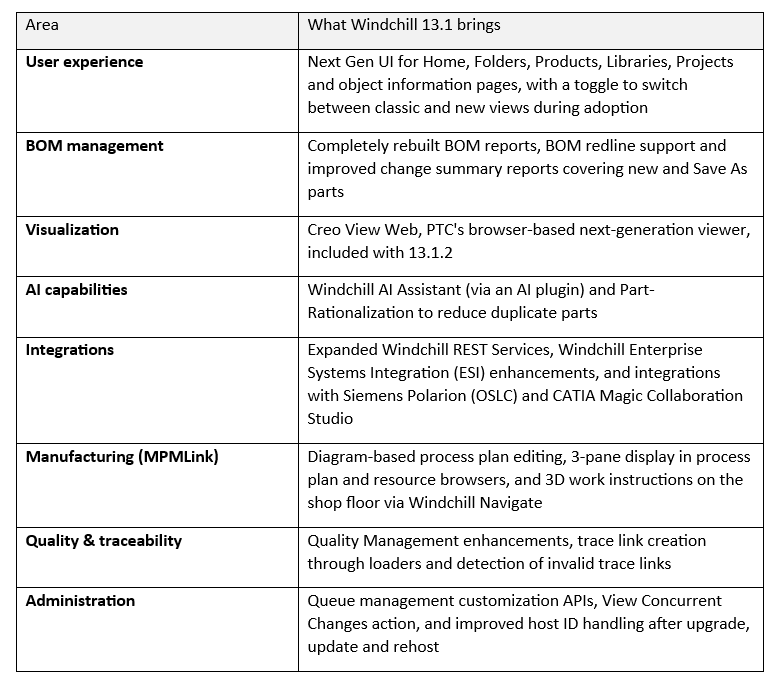
Windchill 13.1 (with maintenance releases 13.1.1, 13.1.2, 13.1.3 and 13.1.4) delivers several capabilities that Windchill 12.0 users do not have:
For an organization still on Windchill 12.0, that is two major release cycles of PLM innovation unlocked in a single program.
Understanding the Windchill 12.0 to 13.1 Upgrade Path
A Windchill upgrade is not an in-place software update. The standard approach is to install the new Windchill release on a target system and then migrate and convert the source database and vaults using PTC's Upgrade Manager. Think of it as building a new system and transferring the existing data and configuration into it.
The second key point: you usually cannot jump straight from Windchill 12.0 to 13.1. Depending on your exact release and datecode (12.0.0, 12.0.1 or 12.0.2 and its CPS level), the supported path often involves one or more intermediate hops, for example:
- Windchill 12.0.2.x → Windchill 13.0.2.x → Windchill 13.1, or Windchill 12.0.x → Windchill 12.1.2.x → Windchill 13.1
PTC publishes the supported source-to-target combinations in its upgrade matrix (PTC Support article CS103572). Getting this wrong is one of the most common causes of failed or restarted upgrade projects, so we always validate the path against your exact datecode before any work begins.
Common Challenges in a Windchill 12 Upgrade
In our experience, the technical upgrade itself is rarely the hardest part. The risk sits in everything built around Windchill over the years:
- Customizations: Custom Java code, JSPs, workflows, listeners and UI extensions written for Windchill 12.0 may use APIs that are deprecated or removed in 13.x and must be refactored.
- Integrations: ERP (SAP, Oracle, Dynamics), ESI, MES and in-house connectors need to be retested and sometimes rebuilt on REST Services.
- CAD data and Workgroup Managers: Creo, AutoCAD, SOLIDWORKS and Inventor integrations must be upgraded in step, including attribute mappings and title block behavior.
- Data volume and quality: Large vaults, orphaned objects and inconsistent data slow down the upgrade and can cause conversion failures.
- Infrastructure changes: New OS, Java, database, application server and authentication (LDAP/SSO) versions that must match the PTC Software Matrix. Coming from 12.0, groups in the source LDAP are migrated into the Windchill database, and PTC recommends moving off Windchill Directory Server afterwards.
- Multi-hop complexity: Each intermediate version adds a full upgrade cycle that has to be tested.
- Downtime limits: Production engineering teams can rarely afford more than a weekend outage.
- User adoption: A new UI and changed workflows need training and change management.
Spirangle's Proven Windchill Upgrade Methodology
At Spirangle Technologies, we follow a structured, test-driven approach that turns the upgrade into a predictable project rather than a leap of faith.
1. Assessment and Discovery
We audit your current Windchill 12.0 environment: version and datecode, modules (PDMLink, ProjectLink, MPMLink, Quality), customizations, integrations, CAD tools, data volumes and infrastructure. The output is a clear upgrade path, risk register and effort estimate.
2. Upgrade Strategy and Architecture
We confirm the supported multi-step path, design the target Windchill 13.1 architecture (on-premise, cloud or hybrid) and align it with the PTC Software Matrix.
3. Environment Cloning and Rehost
We create a copy of production using PTC's rehost process, so every trial upgrade runs on real data without touching your live system.
4. Customization Remediation
Our developers review each customization, retire what Windchill 13.1 now provides out of the box, and refactor the rest to supported 13.x APIs and REST Services.
5. Trial Upgrades
We run full upgrade dry runs with the Upgrade Manager, fix data issues, and measure timings so the production cutover window is known in advance, not guessed.
6. Testing and Validation
Functional, integration, CAD and performance testing, followed by user acceptance testing with your key engineers. We validate object counts, BOMs, workflows and vault integrity between source and target.
7. Production Cutover
A rehearsed, step-by-step cutover plan with rollback options, typically executed over a weekend to keep engineering downtime to a minimum.
8. Hypercare, Training and Handover
Post go-live support, user training on the Next Gen UI and new features, and full documentation for your administrators.
Windchill 12.0 to 13.1 Upgrade Readiness Checklist
Before you start, make sure you can answer these questions:
☐ What is our exact Windchill 12.0 release, datecode and CPS level?
☐ Which Windchill modules and add-ons are licensed and in use?
☐ How many customizations do we have, and are they documented?
☐ Which systems integrate with Windchill (ERP, MES, ALM, CAD)?
☐ Which CAD versions and Workgroup Managers must be supported after the upgrade?
☐ What is our total database and vault size?
☐ Do our target servers, OS, Java and database versions match the PTC Software Matrix for 13.1?
☐ What is the maximum downtime the business can accept?
☐ Who will own user acceptance testing and training?
If several of these are unclear, an upgrade assessment is the right first step.
Typical Project Timeline
Every environment is different, but a typical Windchill 12.0 to 13.1 upgrade follows this shape:
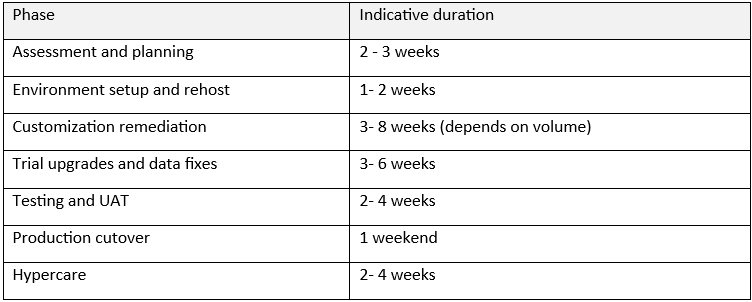
Highly customized or multi-site environments may take longer; lightly customized systems can move faster.
Business Benefits of Upgrading to Windchill 13.1
- Full PTC support and access to ongoing maintenance releases and security fixes
- Higher engineering productivity through the Next Gen UI, faster BOM reporting and browser-based visualization
- Lower IT risk and cost by moving to supported, modern infrastructure, including cloud-ready deployments
- Better digital thread with REST-based integrations to ERP, ALM and manufacturing systems
- A foundation for AI in PLM with Windchill AI Assistant and Part Rationalization
- Reduced technical debt by retiring outdated customizations in favor of out-of-the-box capabilities
Why Choose Spirangle Technologies for Your Windchill Upgrade?
Spirangle Technologies specializes in CAD and PLM software development, customization and automation. Our team brings together:
- Hands-on Windchill expertise across configuration, customization, upgrades and integrations, including Windchill 13.x configuration such as CAD attribute and block mapping to WTParts
- Strong CAD integration knowledge across PTC Creo, Autodesk AutoCAD, Inventor and Revit
- Software engineering depth to refactor legacy Java customizations and build REST-based integrations
- A test-first upgrade methodology that reduces cutover risk and downtime
- Flexible engagement models, from a fixed-scope upgrade assessment to end-to-end upgrade delivery and ongoing Windchill support
Frequently Asked Questions
- Can we upgrade directly from Windchill 12.0 to Windchill 13.1?
Ans : Usually not. Depending on your exact Windchill 12.0 release and datecode, an intermediate upgrade to 13.0.2 or 12.1.2 is typically required. We confirm the supported path against PTC's upgrade matrix during assessment. - How much downtime should we expect
Ans: With trial upgrades and a rehearsed cutover plan, most production cutovers are completed over a weekend. - Will our existing customizations still work?
Ans: Some will, many will need changes. Customizations built on deprecated Windchill 12.0 APIs must be refactored, and some can be replaced by out-of-the-box Windchill 13.1 features. - Do we have to use the new Next Gen UI right away?
Ans: No. Windchill 13.1 lets users toggle between classic and Next Gen pages, and administrators can control whether the toggles are shown, so adoption can be phased. - Will our CAD data and history be preserved?
Ans: Yes. The upgrade converts your existing database and vaults, preserving iterations, versions, BOMs, lifecycle history and relationships. We validate this before go-live. - Can we move to the cloud as part of the upgrade?
Ans: Yes. Since the upgrade already involves building a new target system, it is the ideal moment to move Windchill to new on-premise hardware or a cloud environment.
Conclusion
Staying on Windchill 12.0 carries growing risk: no standard support, aging infrastructure, and a widening gap with what modern PLM delivers. Windchill 13.1 offers a modern UI, better BOM and visualization tools, stronger integrations and a path toward AI-driven PLM. With the right upgrade path, careful handling of customizations and integrations, and rehearsed trial upgrades, the move can be smooth and predictable.
Ready to Plan Your Windchill 13.1 Upgrade?
Talk to Spirangle's PLM experts about your Windchill 12.0 environment. We will review your setup, confirm the right upgrade path and give you a clear plan, timeline and effort estimate.
📧 Email us at [email protected] | 🌐 www.spirangletech.com